Fight magic
with magic.
Attackers already use AI. With super-guard, AI defends for you: it picks up the latest vulnerability alerts from CISA and other agencies early, proposes a fix right away, and runs simulated attacks in your verification environment to compare before and after the fix. Once the fix is proven, all that is left is one approval on your phone.
AvailableCISA KEV checked every 15 minutes (the other 3 feeds every 6 hours) · AI summaries in 3 languages · LINE / Slack alerts · live production posture cards · per-system, version-aware impact · AI fix plans · automatic before / after comparison in a verification environment
AI runs the loop
AI does ① to ⑥ automatically; only ⑦ needs a person
* Measured and carried out in our own environments, November 2026.
From alert to verified fix,
AI runs the whole way.
Until now, getting from an alert to "it is fixed and we checked" took a security engineer days. super-guard hands that road to AI. Every step is recorded, and every step can be followed in the console and on LINE.
Fetch early
Checks CISA KEV every 15 minutes and keeps pulling EU EUVD, US NVD and Japan's JVN.
AvailableCISA KEV every 15 minutes, the other 3 feeds every 6 hours
AvailableThe console shows "published → hub → alerted" times
Assess impact
Compares the software and versions of each system, picks out only the vulnerabilities that really affect you, and shows whether they are being exploited.
AvailableMatching by product name, exploitation flag
AvailablePer-system, version-aware impact (the sensor reports the software and versions)
Fix plan, right away
AI writes a fix for your environment: which version to upgrade to, which setting to change, how to hold the line for now, and how to roll back.
AvailableFor severe vulnerabilities: upgrade, configuration, interim protection and rollback; every plan is checked by code
Design the attack
AI picks a simulated attack for this vulnerability from a library of safe probe templates, and sets limits on strength and time.
Available5 generic templates that measure detection
AvailableTemplates that judge from the answer whether an attack worked (.env exposure, path traversal, admin pages, sign-in)
Attack before the fix
First, one attack on the verification environment. Can the vulnerability be exploited? Is it detected?
AvailableRuns on its own in an isolated verification environment; records whether it worked and whether it was detected
Fix, then attack again
The fix is applied in the verification environment and the same attack runs once more, comparing before and after.
AvailableFixes what got through, attacks again, and judges before vs after side by side
Approve and ship
The verification report arrives on LINE. One approval from you and production gets the same fix, then stays under watch. Important changes are approved with a passkey.
AI does ① to ⑥ on its own. ⑦, the production change, is always approved by a person.
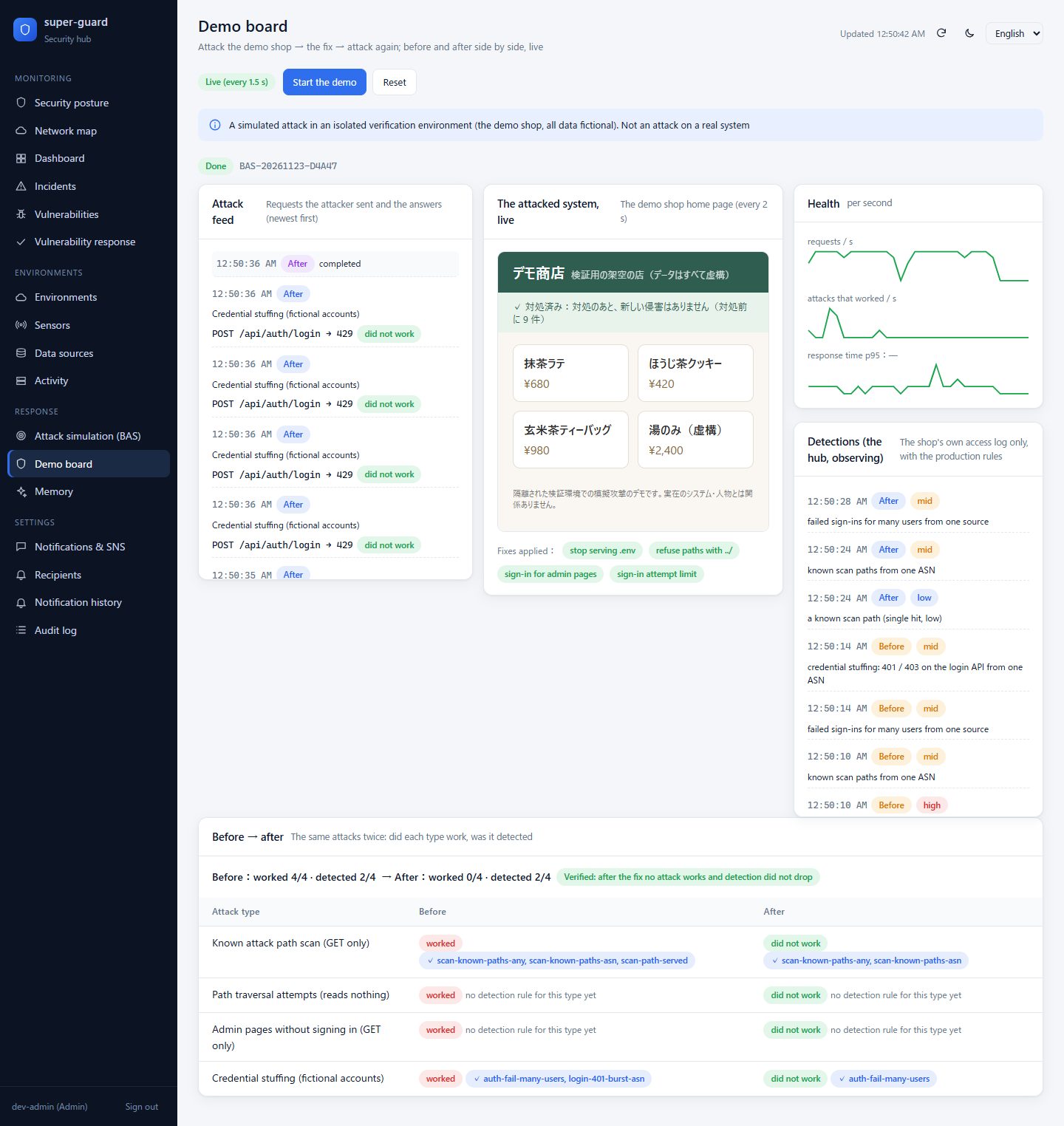
Before the fix
Fix
Upgrade Caddy to 2.11.10
+ 1 new detection rule
After the fix
Attackers already
have AI.
Attacks got cheap: every company is a target now, not just large ones. They come 24 hours a day, at several systems and clouds at once. Against attackers who use AI, only defense that uses AI keeps up.
Attacks where AI does 80–90% of the work
In November 2025 Anthropic reported a group, believed to be state-backed, using an AI agent to try to break into about 30 organizations. People made decisions at only 4–6 points per attack. Attacks moved from human speed to machine speed.
Malware that rewrites its own code
Google Threat Intelligence (GTIG) found malware that asks an LLM to rewrite itself while running (PROMPTFLUX and others) and malware that has an LLM write its attack commands. Defenses built on fixed signatures work less and less.
BEFORE — defense as usual
- A separate monitor per system. An attack across environments stays under every single threshold
- People watch screens. Nobody watches at night or on holidays
- Hundreds of English vulnerability records a day. Finding the ones that matter takes the whole day
- "We patched it." Nobody checks whether the attack is really blocked now
AFTER — super-guard
- One hub links the records of every environment and finds the same attacker across them
- Rules detect 24 hours a day; only the essentials go to LINE or Slack
- AI summarizes the exploited vulnerabilities that touch your assets, in 3 languages
- Simulated attacks before and after the fix prove, in numbers, that it holds
Loop, show, alert, protect.
AI runs the loop, from alert to verification
Fetching alerts, assessing impact, writing the fix, attacking before and after, writing the verification report: AI does it in one run. Your part is one approval for the production change.
Every environment, and every system's state
Azure, AWS, Google Cloud, Alibaba Cloud, data centers, the office network and business systems on one screen. Cross-environment correlation connects the moves you would miss one system at a time. For each system it also shows whether it is up, reachable and under attack.
In your hand the moment it matters
Alerts go to LINE or Slack by severity, in each person's language; a link opens the details without signing in again (read-only). False alarms such as bot scans are checked against the original records and closed automatically, and people's reasons are kept as "memory".
Automation designed to be safe
Simulated attacks go only to your own verification environments with proven ownership, under caps and a kill switch. Blocks in production happen only after a person approves, only inside a reserved band, and roll back when they expire. The hub only signs; the executor in the environment verifies again before it acts.
Every system:
is it safe right now?
No more staring at a pile of alerts. One card per monitored system: is it usable, is the network through, who is attacking it right now, and which vulnerabilities are still open.
Production
- Is it usable: external probes plus live access logs (requests, error rate, response time)
- Is the network through: sensor heartbeats and traffic per line
- Attacks now: from where, what kind, blocked or let through
- Vulnerabilities still to fix
Verification environment
- The same live status as production, plus
- The attack in progress: each simulated request, how the system answered, and whether it was detected
- Before-and-after comparison charts
- 32 attacks: scans from 3 sources, all blocked
- 2 open vulnerabilities (1 exploited)
- 5 attacks: login brute force, 4 blocked, 1 under review
- 0 open vulnerabilities
3/3 → 0/3
1/3 → 3/3
One console in
Japanese, Chinese and English.
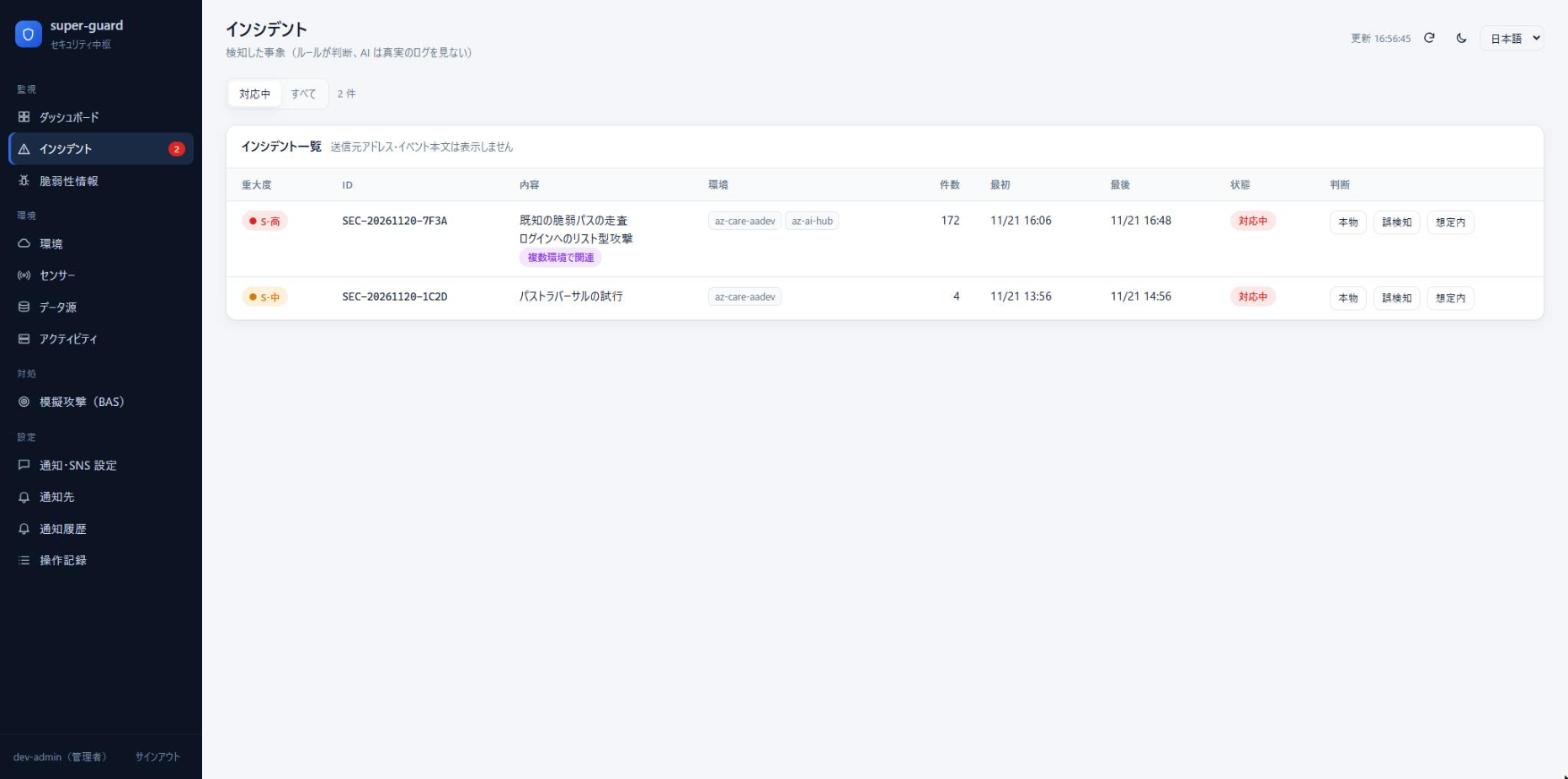
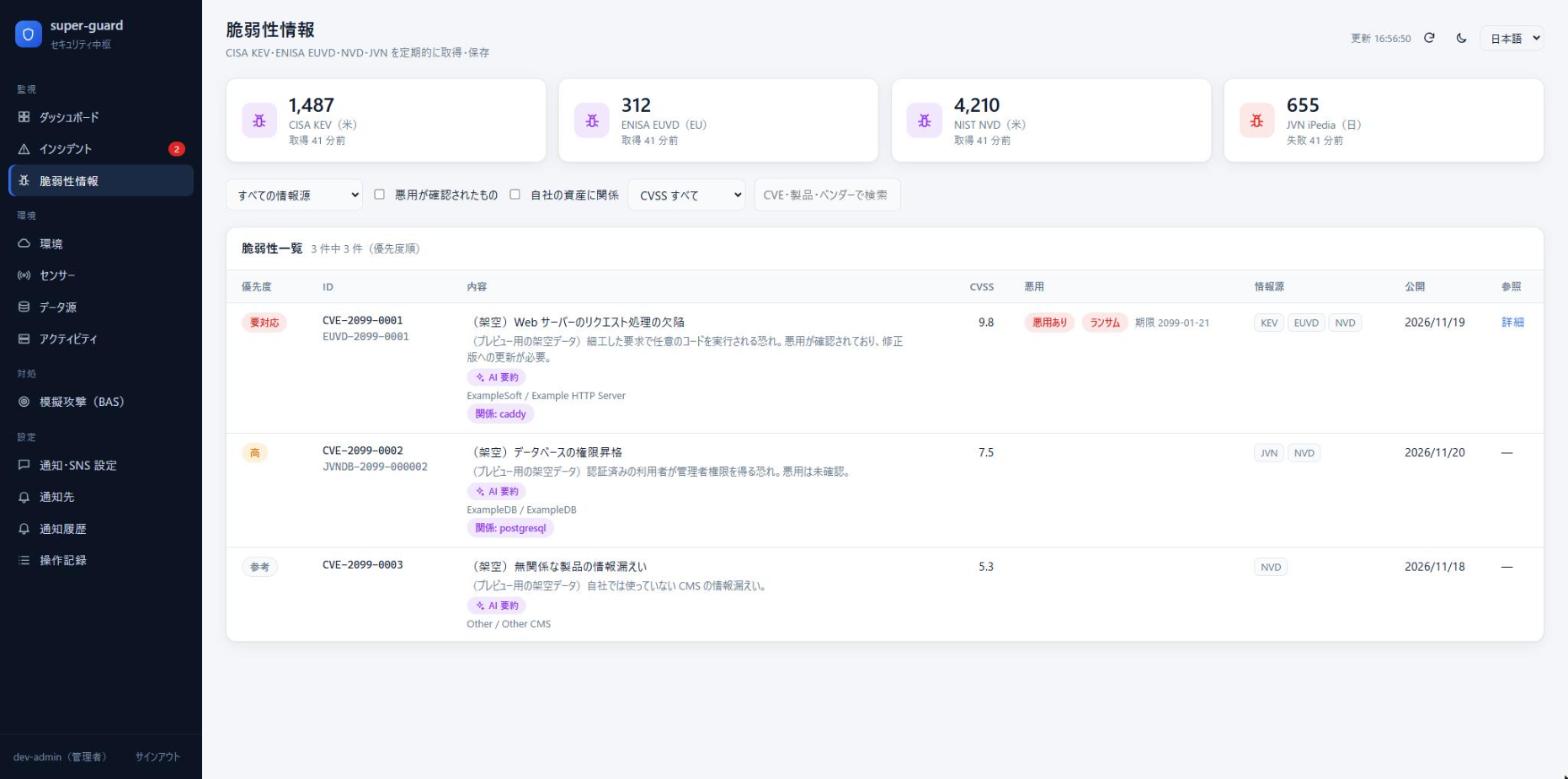
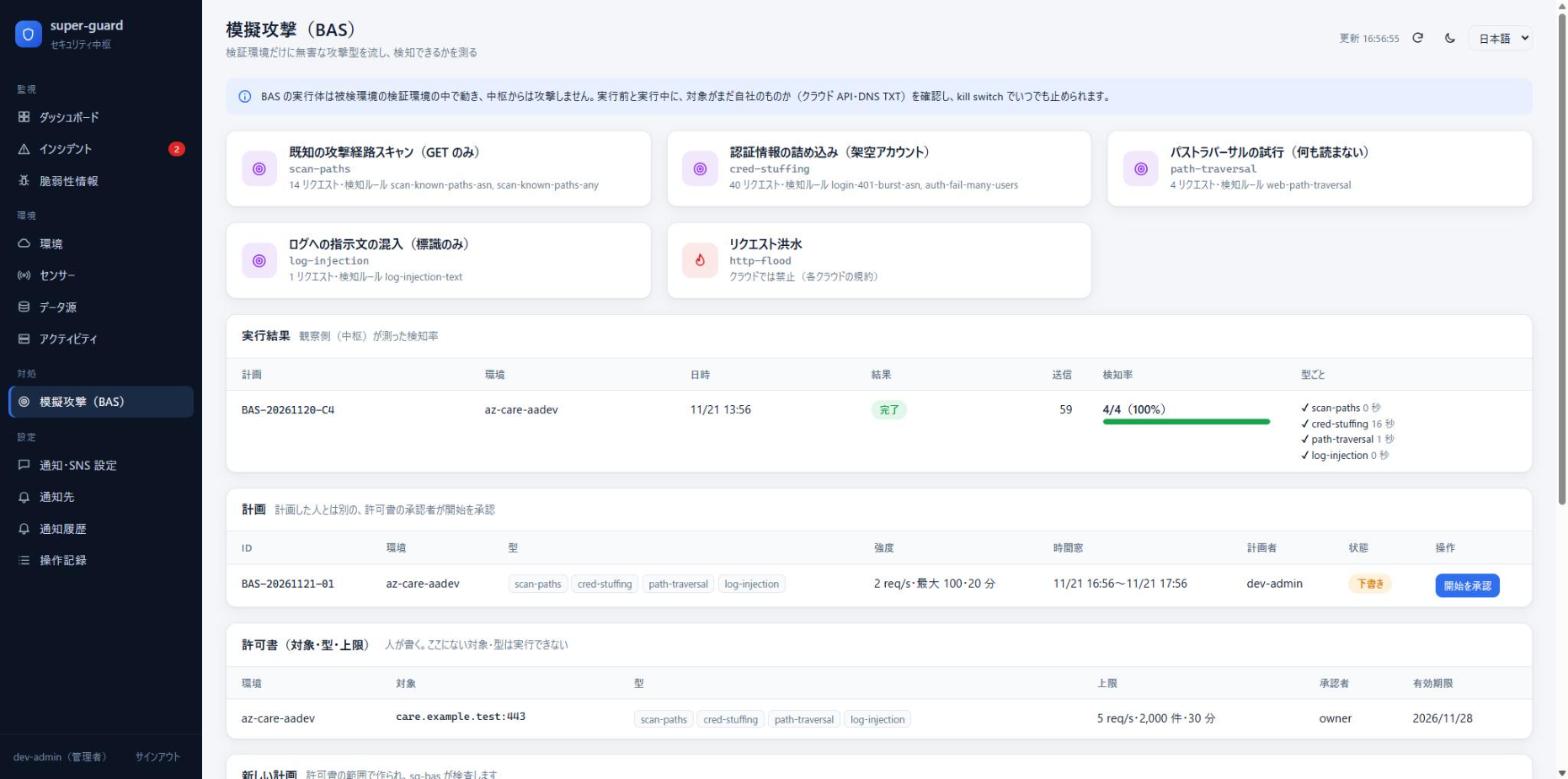
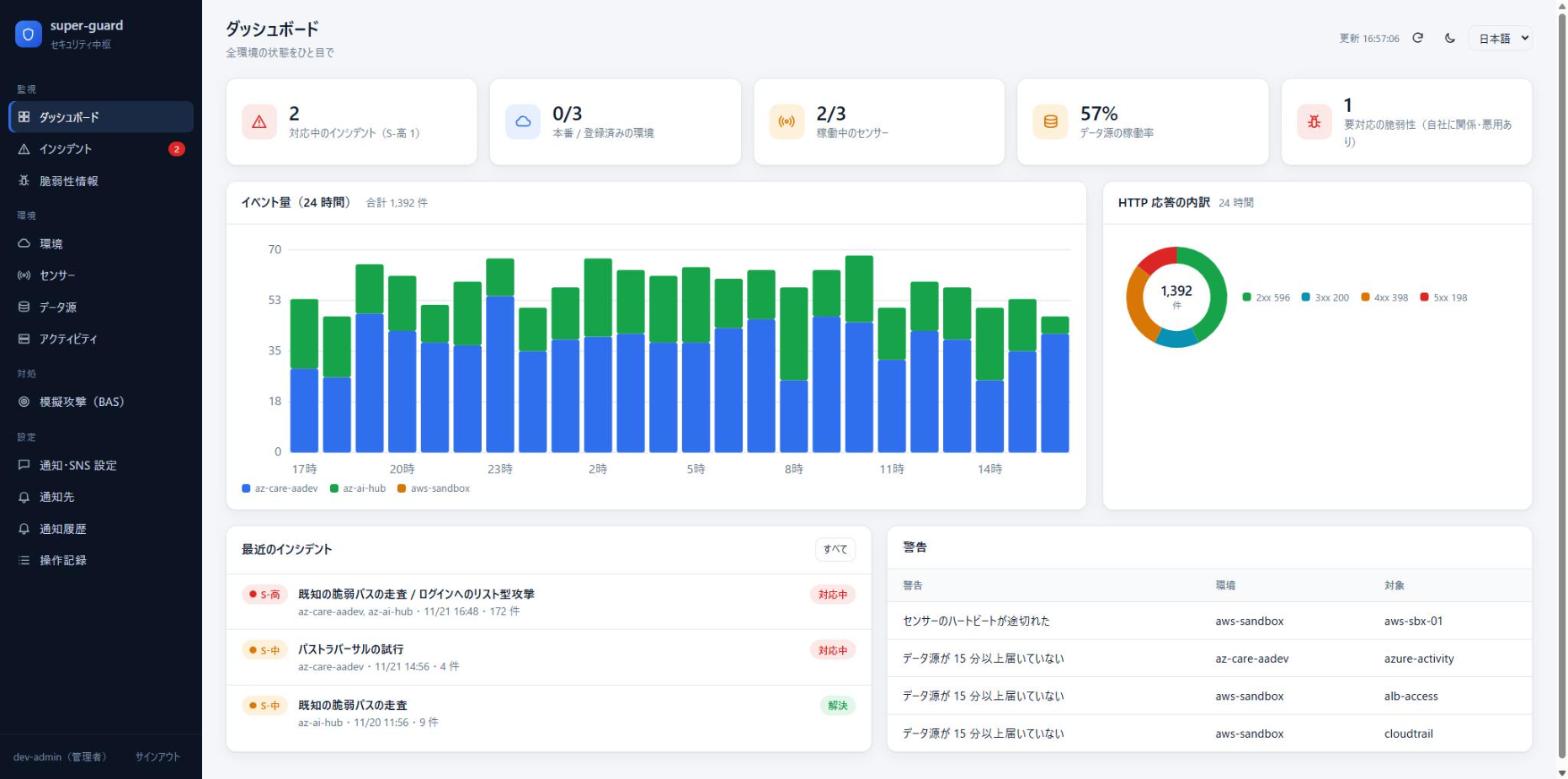
The console available today. All data on the screens is fictional. Screens shown in Japanese; the console also speaks Chinese and English.
When a firewall rule changes
in the middle of the night.
What happened in a real drill on our own AI hub environment on 22 November 2026 (a deny rule for a documentation address, added for two minutes).
The hub reads the Azure Activity Log and detects the rule change (S-high)
About 5 minutes later the LINE alert arrives, in the person's language
The LINE link shows the details on the phone without signing in again
A reply acknowledges it. The verdict is recorded in the console, and its reason can be remembered
Outbound only.
Raw logs stay home.
The hub is one independent server per company. Sensors in each environment connect out to the hub (outbound HTTPS with mutual TLS); the hub never signs in to an environment. It receives events, aggregates and configuration only.
Outbound only
Sensors reach the hub over outbound TCP 8443 with mutual TLS. No inbound port is opened in the environment.
Raw logs stay in the environment
Only events, aggregates and configuration go to the hub. No query strings, cookies or bodies; user IDs are pseudonymized in the environment.
Reading and writing are separate
Monitoring uses read-only identities only (resource-group Reader on Azure, keyless OIDC federation on AWS and GCP). Writing uses another identity, only where you enable it.
Two keys
The hub only signs a ticket. The executor in the environment verifies it against its own rules before acting. Even a compromised hub can do no more than a time-limited block inside the band.
Rules detect; AI summarizes, plans and verifies
22 detection rules and cross-environment correlation decide. Besides summarizing vulnerabilities and proposing analyses, AI writes fix plans and plans the simulated attacks. Scans that ended in a refusal are checked against the records and closed automatically.
The hub watches itself
After a stop, the hub reports the downtime and re-checks the records of that time (up to 24 hours). No silent blind spots.
Simulated attacks hit only your own verification environment
Only verification environments you register and whose ownership is proven (DNS TXT, cloud API) are attacked. Strength and time have hard caps, and a kill switch stops everything at any moment. Only non-destructive probes are used; production is never attacked, only watched.
Connection levels — start read-only, grow step by step
| Level | What it does | What the environment provides |
|---|---|---|
| SC1 Assets and config | Assets and firewall rules, configuration drift | A read-only identity (declared scope only) |
| SC2 Monitoring | Event collection, cross-environment correlation, sensor liveness | A sensor + outbound 8443 + logging turned on |
| SC3 Rehearsal | Rehearse responses in a verification environment | A verification environment with the same version and config |
| SC4 Response | After approval, block inside the band and roll back on expiry | An executor identity (writes inside the band only) |
So that AI itself
is not the way in.
AI goes up to verification; people approve production
AI works on its own only up to the verification environment. Every production change is approved by a person. The AI holds no cloud identity and no signing key.
Attacker text is data
Fields attackers can write (user agents, URLs, login names) are isolated; instruction-like text is treated as evidence of an attack.
Real logs never go to an LLM
The AI gets public vulnerability data and abstract asset facts such as software names and versions, nothing more. Real logs are not sent until an LLM in a Japan region is chosen.
No personal data in memory
A memory with names, contact details or secrets is refused as a whole, never masked. The audit log never holds the text.
A cap on cost
AI use has a daily cap. When it is reached only the AI pauses; detection and alerts continue.
The environment stays in charge
The owner can cut an environment off from the hub at any time by removing the trust or stopping the executor.
What to connect, and what to prepare
Every environment starts read-only. Writing (blocks) is enabled only in the environments and ranges you choose. For the AI loop, each system needs a verification environment with the same version and configuration as production (if you have none, we build one with you at onboarding).
| Environment | Read-only identity | Main logs | Verification environment |
|---|---|---|---|
| Microsoft Azure | Reader on the resource groups, for the hub's managed identity | Activity Log, VNet flow logs, web access logs, host sign-in logs | A separate resource group, same version and config as production |
| AWS | An IAM role via OIDC federation (SecurityAudit); no access keys | CloudTrail, VPC flow logs, ALB / CloudFront access logs | A separate account or VPC, same version and config |
| Google Cloud | Workload Identity Federation (viewer roles); no key files | Cloud Audit Logs, VPC flow logs, load balancer logs | A separate project, same version and config |
| Alibaba Cloud | A RAM role + OIDC (ReadOnlyAccess); no AccessKey | ActionTrail, VPC flow logs, SLB / WAF access logs | A separate VPC, same version and config |
| Data center / private cloud | None (only the sensor certificate in the management segment) | Firewall and proxy syslog, NetFlow, virtualization audit logs | VMs or containers of the same version |
| Office network | None (an office sensor) | UTM and router syslog, DNS, identity logs | Optional (a test segment) |
| Business systems (web) | None (the sensor reads the access log) | JSON access logs of the reverse proxy (Caddy, nginx and others) | Same version and config; if none, built with you at onboarding |
The detailed permissions and settings come with the connection guide at onboarding (Japanese and Chinese).
Getting started — the hub in a week, live alerts in a month
Week 1 · set up the hub: one VM, up in a day
Week 2 · connect read-only: SC1 checks the permissions automatically
Week 3 · sensors and trial run: SC2; choose recipients and languages
Week 4+ · live alerts: AI vulnerability summaries start too
Next · the AI loop: verification environment + automatic attack simulation + before/after comparison
Cost guide (per month)
| Hub VM (24 hours) | about ¥12,000 |
| Logs and flow records per cloud | about ¥2,000–15,000 per environment |
| AI (summaries, analysis) | kept under a daily cap |
| e.g. Azure 1 + AWS 1 + GCP 1 + office | about ¥30,000–65,000 |
Estimates; they depend on log volume and configuration. Verification environments are extra.
Questions
- AI attacks automatically. Could it hit production? → No. It attacks only verification environments you register and whose ownership is proven. Strength has hard caps, and an emergency stop works at any time
- The fix is written by AI. Can I trust it? → Each fix is first attacked, applied and attacked again in the verification environment, and the comparison proves it works. Then you approve it
- What if the hub is taken over? → It has no write access to your clouds and only signs; nothing beyond a time-limited block inside the band is possible
- We do not want raw logs to leave → They do not. Only events and aggregates go to the hub
- We have no SOC → The hub watches 24 hours a day and sends only the essentials. It is designed for small IT teams
Availability (November 2026)
Available
- Rule-based detection and cross-environment correlation
- LINE / Slack alerts (3 languages, view links)
- Vulnerability feeds (KEV checked every 15 minutes; EUVD, NVD, JVN every 6 hours), "published → alerted" times, matching by product name, AI summaries in 3 languages
- Live per-system posture (external probe, availability, network, usage, attacks)
- Azure Activity Log and web access logs
- Attack simulation (BAS, 5 generic templates that measure detection), auto-triage, memory
- Console in Japanese, Chinese and English
The AI loop
- Per-system, version-aware impact
- AI fix plans (upgrade, settings, interim defense, rollback)
- Attack simulation in a verification environment, before vs after the fix
- Verification reports and the approval flow to production
- The "attack in progress" view of verification environments
Set up at onboarding
- AWS, Google Cloud and Alibaba Cloud connections
- Sensors for data centers and office networks
- A verification environment per system
- Approved response (SC4, band and expiry)
- Trusted source ASNs and a second contact
Coming
- Real-log analysis with an LLM in a Japan region
- Vendor advisories (MSRC, Ubuntu USN and others)
- Weekly reports delivered automatically
- As a SaaS
Attackers use AI.
Defend with AI.
Start with one environment, read-only. In a week the hub is in place and you can see where you stand.